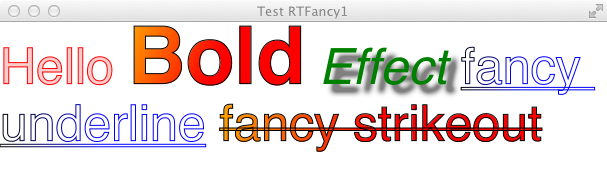
This page host samples of the DOM API in use along with the rendering result.
Visit DOM API Details for some background information on the API.
@Override
public void start(Stage stage) throws Exception {
    String family = "Helvetica";
    double size = 20;

    Div div = new Div(40, 40);
    Span span1 = new Span("Hello ");
    span1.setFont(Font.font(family, size));
    Span span2 = new Span("Bold");
    span2.setFont(Font.font(family, FontWeight.BOLD, size));
    Span span3 = new Span(" World");
    span3.setFont(Font.font(family, FontPosture.ITALIC, size));
    div.getChildren().addAll(span1, span2, span3);

    Group group = new Group(div);
    Scene scene = new Scene(group, 500, 500, Color.WHITE);
    stage.setTitle("Hello Rich Text");
    stage.setScene(scene);
    stage.show();
}
|
|
@Override
public void start(Stage stage) throws Exception {
    stage.setTitle("Hello Rich Text FXML");
    stage.setScene((Scene)FXMLLoader.load(getClass().getResource("hellorichtext.fxml")));
    stage.show();
}
|
<Scene width="500" height="500" fill="white" xmlns:fx="http://javafx.com/fxml">
    <stylesheets>
        <URL value="@style1.css"/>
    </stylesheets>

    <Group>
        <Div styleClass="paragraph">
            <Span styleClass="span1">Hello </Span>
            <Span styleClass="span2">Bold</Span>
            <Span styleClass="span3"> World</Span>
        </Div>
    </Group>
</Scene>
|
.paragraph {
	-fx-font-family: "Helvetica";
	-fx-font-size: 50px;
	-fx-text-origin: top;
}

.span1 {
}

.span2 {
	-fx-fill: red;
	-fx-font-weight: bold;
}

.span3 {
	-fx-fill: green;
	-fx-font-style: italic;
}
|
|
@Override
public void start(Stage stage) throws Exception {
    stage.setTitle("Hello Rich Text FXML");
    stage.setScene((Scene)FXMLLoader.load(getClass().getResource("fancy.fxml")));
    stage.show();
}
|
<Scene width="800" height="500" fill="white" xmlns:fx="http://javafx.com/fxml">
    <stylesheets>
        <URL value="@style2.css"/>
    </stylesheets>
    <Pane fx:id="pane">
         <Div styleClass="paragraph" wrappingWidth="${pane.width}">
            <Span styleClass="span1, fancy1">Hello </Span>
            <Span styleClass="span2, big, fancy2">Bold</Span>
            <Span text=" "/>
            <Span styleClass="span3, fancy3">Effect</Span>
            <Span text=" "/>
            <Span styleClass="underlinefancy">fancy underline</Span>
            <Span text=" "/>
            <Span styleClass="strikeout, fancy2">fancy strikeout</Span>
        </Div>
    </Pane>
</Scene>
|
.paragraph {
	-fx-font-family: "Helvetica";
	-fx-font-size: 50px;
	-fx-text-origin: top;
}

.span1 {
}

.span2 {
	-fx-fill: red;
	-fx-font-weight: bold;
}

.span3 {
	-fx-fill: green;
	-fx-font-style: italic;
}

.big {
	-fx-font-size: 80px;
	-fx-cursor: hand;
}

.fancy1 {
	-fx-stroke: rgb(255, 0, 0);
	-fx-fill: rgba(255, 0, 0, 0.2);
}

.fancy2 {
	-fx-fill: linear-gradient(from 0% 0% to 100% 100%, repeat, orange 0%, red 50%);
	-fx-stroke: black;
	-fx-stroke-width: 1;
}

.fancy3 {
	-fx-effect: dropshadow(gaussian, gray, 8, 0.5, 8, 8);
}

.underlinefancy {
	-fx-underline: true;
	-fx-fill: transparent;
	-fx-stroke: linear-gradient(from 0% 0% to 100% 100%, repeat, black 0%, blue 50%);
	-fx-stroke-width: 1;
}

.strikeout {
	-fx-strikethrough: true;
}
|
|
@Override
public void start(Stage stage) throws Exception {
    String family = "Helvetica";
    double size = 20;

    Div div = new Div(0, 100);
    Span span1 = new Span("Lets have ");
    span1.setFont(Font.font(family, size));
    Span span2 = new Span("embedded objects: ");
    span2.setFont(Font.font(family, FontWeight.BOLD, size));
    Rectangle rect = new Rectangle(80, 60);
    rect.setFill(null);
    rect.setStroke(Color.RED);
    Span span3 = new Span(" then button ");
    Button button = new Button("click me");
    Span span4 = new Span(" finally an image ");
    ImageView image = new ImageView("file:///Users/felipe/Documents/felipe/worker.png");
    Span span5 = new Span(".");
    span5.setFont(Font.font(family, size));

    div.getChildren().addAll(span1, span2, rect, span3, button, span4, image, span5);

    Scene scene = new Scene(div, 800, 500, Color.WHITE);
    div.wrappingWidthProperty().bind(scene.widthProperty());

    stage.setTitle("Hello Rich Text with Embedded Objects");
    stage.setScene(scene);
    stage.show();
}
|
|
@Override
public void start(Stage stage) throws Exception {
    String family = "Helvetica";
    double size = 20;

    Div div = new Div();
    div.setTranslateX(30);
    div.setTranslateY(100);
    div.setRotate(45);
    Span span1 = new Span("Hello ");
    span1.setFont(Font.font(family, size));
    Span span2 = new Span("Bold");
    span2.setRotate(-45);
    span2.setFont(Font.font(family, FontWeight.BOLD, size));
    Span span3 = new Span(" World");
    span3.setFont(Font.font(family, FontPosture.ITALIC, size));
    div.getChildren().addAll(span1, span2, span3);

    Group group = new Group(div);
    Scene scene = new Scene(group, 500, 500, Color.WHITE);
    stage.setTitle("Hello Rich Text");
    stage.setScene(scene);
    stage.show();
}
|
|